How to send abandoned cart reminder messages in WooCommerce using WhatsApp
Since you are here, allow me to assume you run a WooCommerce store and would like to recover some of those abandoned carts that are floating around your shop like lonely shopping baskets in an empty supermarket parking lot. 🙃
WooCommerce is not very generous when it comes to showing what happens before an order is placed. A customer can add products to the cart, visit the checkout, think about it for a moment, get distracted by an excited family member, close the tab and disappear into the deep blue. Unless that cart turns into an order, WooCommerce will not do much with it.
The problem is obvious — money is silently pouring down the drain. The opportunity is that some of these customers just needed a little reminder, a small push, or maybe a friendly message saying: “Hey, your cart is still here, you can resume shopping now.”
In this article we will look at how to use WhatsApp together with CartBounty to save carts and send abandoned cart reminder messages in WooCommerce. Here is a list of topics we will be covering:
- How to save abandoned carts in WooCommerce
- Selecting the best recovery strategy
- Why use WhatsApp for abandoned cart recovery
- What you need before sending WhatsApp reminders
- How to connect CartBounty with WhatsApp
- Setting up WhatsApp abandoned cart reminders
- Personalizing WhatsApp abandoned cart messages
- Using coupons in WhatsApp reminders
- Limiting WhatsApp reminders by country
- Using Quiet hours
- Excluding specific products and categories
- Collecting customer opt-in for WhatsApp reminders
- Example of a 3-step WhatsApp abandoned cart reminder series
- Best practices for WhatsApp abandoned cart reminders
How to save abandoned carts in WooCommerce
Before you can send any abandoned cart reminders, you must first start saving abandoned carts. You cannot recover what you do not capture. That would be like trying to call back a customer who left your physical store without ever asking for their phone number.
There are different ways to save abandoned carts in WooCommerce. You could build your own custom solution, use a large marketing platform, or install a plugin that is focused on this exact task.
CartBounty is built specifically for saving and recovering abandoned carts in WooCommerce. It captures recoverable carts when a customer leaves their email address or phone number on your store. This means you do not have to wait for the customer to click the “Place order” button before the cart is saved.
CartBounty includes various clever tools that help you collect more recoverable carts, such as:
- Exit Intent or Early capture tools
- WooCommerce Checkout form
- Custom input field
- User’s account if he has logged in
- Web push notification permission
CartBounty Exit Intent popup example that appears before a user tries to leave an abandoned shopping cart
Early capture is another useful feature since it allows you to collect customer details much earlier in the journey. This is especially useful if your customers often add products to the cart but never reach the checkout page. IT is even possible to forbid adding products to the cart until email or phone numbers have been provided.
Once CartBounty has saved the cart and collected the customer’s phone number with proper consent, you can start thinking about how to bring that customer back.
Selecting the best recovery strategy
Now that abandoned carts are being saved, the next question is: how should you recover them?
There is no single magical abandoned cart recovery method that works equally well for every store. Your strategy should depend on things like:
- Your target audience
- Product price
- Average order value
- Number of abandoned carts
- Countries you sell to
- Available time and resources
- Your brand tone and values
- Customer expectations
You could manually contact customers, send automated email reminders, use SMS messages, send web push notifications, use WhatsApp, or combine multiple channels into a more complete recovery strategy.
Manual contact can work very well for high-value carts, custom products or B2B stores. A personal message can have a much stronger effect than an automated one. But it also takes time, and if you are getting dozens or hundreds of abandoned carts every week, manually chasing each one will quickly turn into a full-time job with questionable mental health benefits.
Automated reminders are more scalable. They allow you to reach customers at the right time without sitting behind your laptop with a cup of coffee and a list of abandoned carts, wondering who to message next.
The most common abandoned cart recovery channels are:
- SMS text messages
- WhatsApp messages
- Web push notifications
- Phone calls
Email is still the most neutral and common option. SMS is short, direct and highly visible. Push notifications are useful when the customer has subscribed to them. WhatsApp, however, sits in a very interesting place. It feels personal, it is mobile-first, and many customers already use it daily.
This makes WhatsApp a powerful channel for time-sensitive abandoned cart reminders.
Why use WhatsApp for abandoned cart recovery
WhatsApp is one of the most popular messaging apps in the world. For many people, it is not just another app on their phone. It is where they talk with friends, family, delivery companies, service providers and businesses.
That makes WhatsApp a very strong channel for abandoned cart recovery, but also one that should be used carefully.
A WhatsApp abandoned cart reminder can feel more personal than an email. It arrives directly on the customer’s phone and is usually noticed much faster. This is great if your message is helpful, timely and expected.
However please know also that it is not great if your message feels like spam delivered straight into someone’s pocket. So use WhatsApp with care. A good WhatsApp abandoned cart reminder should be:
- Short
- Friendly
- Useful
- Sent at a reasonable time
- Based on proper customer consent
- Easy to act on
- Easy to unsubscribe from
You are not trying to shout at the customer. You are trying to gently remind them that their cart is still saved and that they can return to complete the order.
What you need before sending WhatsApp reminders
Before you can start sending abandoned cart reminders using WhatsApp, there are a few things you will need.
First, you need CartBounty Pro installed on your WooCommerce store. CartBounty will save abandoned carts, collect customer data and handle the recovery automation from your WordPress dashboard.
Second, you need access to Meta’s WhatsApp Business Platform. This includes creating or using:
- A Meta Business account
- A Meta developer account
- A Meta app
- A WhatsApp Business Account, also known as WABA
- A registered business phone number
- A system user access token
- Your Meta app ID
This may sound a bit technical at first. And yes, Meta’s setup screens can sometimes feel like you accidentally opened the cockpit of a small aircraft. But once the connection is created, CartBounty makes the actual abandoned cart reminder setup a smooth sailing.
How to connect CartBounty with WhatsApp
To connect CartBounty with WhatsApp, you must first obtain the required API credentials from Meta. CartBounty needs these credentials to communicate with WhatsApp and send abandoned cart reminder messages on behalf of your business phone number.
Here is the basic setup process:
- Create a Meta Business account if you do not already have one.
- Sign up for a free Meta developer account.
- Create a new Meta app.
- Create a system user access token that will be used by CartBounty to communicate with WhatsApp.
- Register your business phone number. This will be the number used to send abandoned cart reminders.
- Open the API Setup section of your Meta app.
- Select your phone number and copy your WhatsApp Business Account ID.
- Open your Meta app settings and copy your app ID.
- Switch your Meta app from Development mode to Live.
- Go back to your WordPress dashboard.
- Open WooCommerce > CartBounty Pro.
- Go to Recovery > WhatsApp.
- Paste your system user access token and WhatsApp Business Account ID.
- Save the settings.
- If the connection is successful, an additional field will appear.
- Paste your Meta app ID and save the settings again.
If everything has been connected successfully, CartBounty will display a green “Connected” notice and the WhatsApp automation workflow settings will become available.
At this point your WooCommerce store is connected with WhatsApp and you can begin setting up your abandoned cart reminder messages.
Setting up WhatsApp abandoned cart reminders
CartBounty allows you to send one or multiple WhatsApp abandoned cart reminder messages. This means you can create a small reminder sequence instead of relying on just one message and hoping for the best.
Here is how to set up your first WhatsApp abandoned cart reminder:
- Go to your WordPress dashboard.
- Open WooCommerce > CartBounty Pro.
- Go to Recovery > WhatsApp.
- Follow the TCPA / GDPR compliance guide and mark it as complete once done.
- Click on the first message to open its settings.
- Enable the message.
- Choose when the message should be sent.
- Edit the message content.
- Optionally personalize the message using dynamic content tags.
- Optionally include a coupon.
- Test your message.
- Repeat the same steps for additional messages if you would like to create a reminder series.
- Select the WhatsApp business phone number that will send the messages.
- Optionally limit sending by country.
- Optionally enable Quiet hours.
- Optionally set up Exclusions.
- Save the settings.
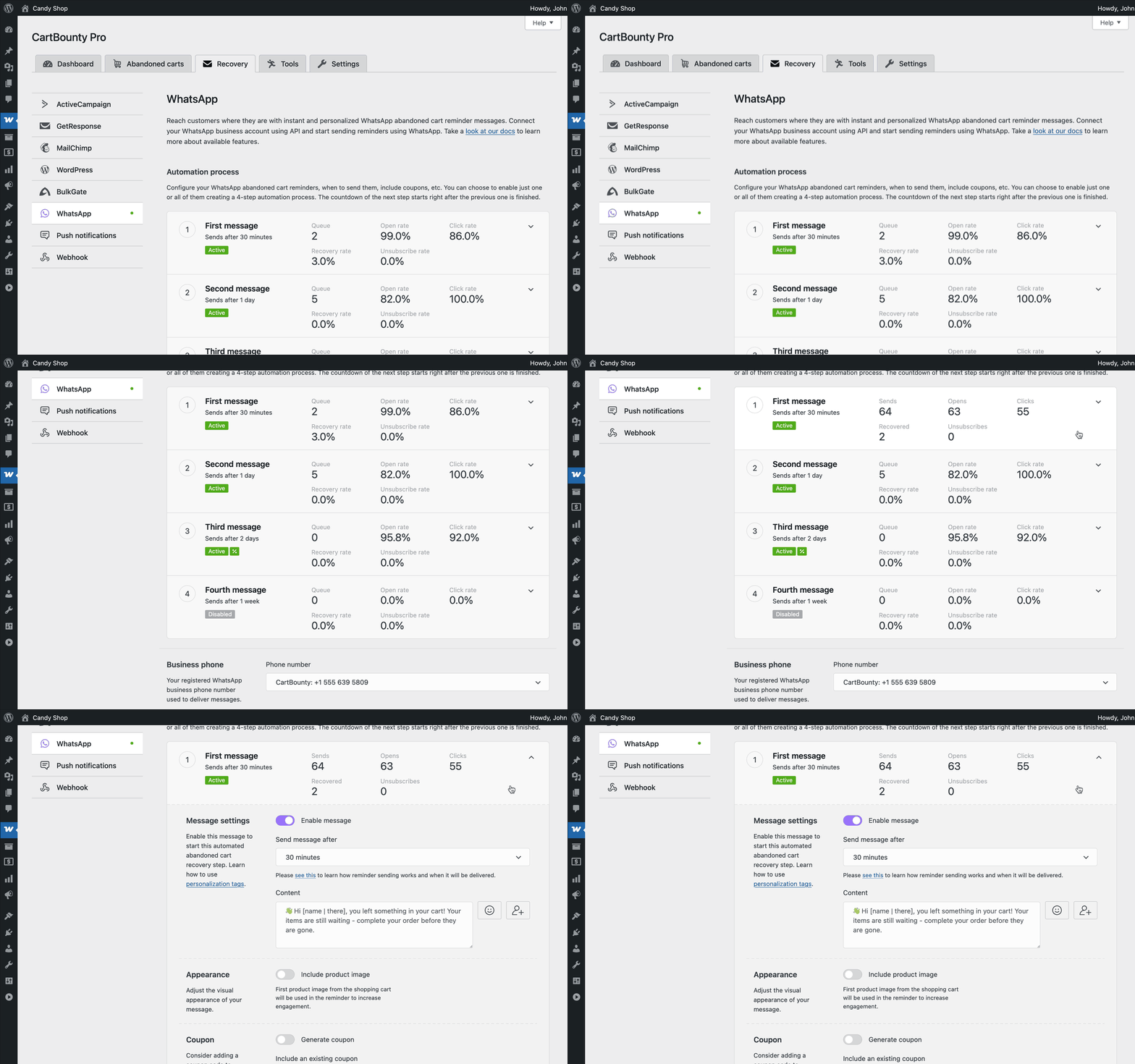
One important detail to keep in mind is that CartBounty considers a shopping cart abandoned after 1 hour of inactivity. This means that if you set the first WhatsApp reminder to be sent after 5 minutes, it will be delivered 60 minutes after the cart has been abandoned. However this limitation can be adjusted from 60 minutes to 30 or 20 minutes using a filter.
In other words, the customer will not receive a WhatsApp reminder 5 minutes after adding something to the cart. The cart first has to become abandoned, and only then the reminder timer starts.
This is a good thing. It prevents messages from being sent too early while the customer is still browsing, comparing products or trying to find their wallet under a pile of old receipts.
Personalizing WhatsApp abandoned cart messages
A generic reminder is better than no reminder. But a personalized reminder is usually much better than a generic one. CartBounty allows you to personalize WhatsApp messages using dynamic content tags. These tags let you include customer and cart details inside the reminder message.
For example, instead of sending something cold and robotic like:
“Your cart has been abandoned. Complete purchase.”
You could send something more friendly:
“Hi John, looks like you left something nice in your cart. Your items are still saved and you can complete your order here.”
That feels much better. Less like a machine. More like a helpful reminder.
When creating WhatsApp reminder messages, keep the message short and clear. WhatsApp is not the place for a long essay about your brand history, your founder’s childhood dreams and the emotional journey of your product catalog.
A good WhatsApp abandoned cart message should include:
- A friendly greeting
- A short reminder
- A reason to return
- A recovery link
- Optional coupon or incentive
- Clear unsubscribe option if applicable
Using coupons in WhatsApp reminders
Sometimes a reminder is enough. Sometimes the customer needs a little extra motivation. CartBounty allows you to include both static coupons and unique one-time generated coupon codes inside WhatsApp abandoned cart reminders.
This can be very useful for the second or third reminder in your sequence. For example, you might not want to offer a discount immediately after the cart is abandoned. If the customer is already planning to return, giving away a discount too early could reduce your margin for no reason.
A more balanced approach could look like this:
- First reminder: friendly reminder without a discount
- Second reminder: stronger reminder with urgency
- Third reminder: final reminder with a coupon
To enable coupons inside WhatsApp reminders:
- Go to WooCommerce > CartBounty Pro.
- Open Recovery > WhatsApp.
- Open the message where you would like to include a coupon.
- Choose whether to generate a unique coupon for each abandoned cart user or use an existing coupon.
- Set usage restrictions if necessary.
- Add the coupon content to your message.
- Save the settings.
CartBounty also allows you to use conditional coupon content. For example:
[if: coupon]Use this coupon code [coupon] to get a discount![else]Hurry while the cart is still saved![endif]
This is useful because not every abandoned cart user may be eligible for the coupon. If the customer is not eligible, they will not receive the coupon code and it will not be automatically applied.
And did you notice how the message does not include a recovery link? That is because CartBounty adds the recovery link automatically at the bottom of the message as a button as well as unsubscribe link.
Another great detail is that if the customer clicks the recovery link inside the message, the coupon code will be automatically applied. So you do not have to make the customer copy and paste the code manually like it is 2006.
Limiting WhatsApp reminders by country
By default, abandoned cart reminders will be sent to all countries. However, CartBounty allows you to limit WhatsApp reminders to specific countries.
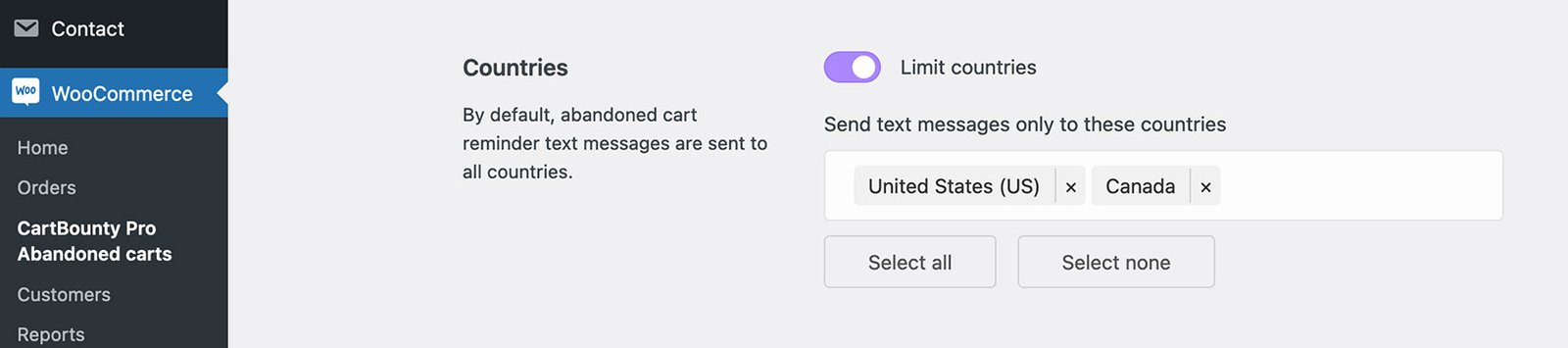
This is useful if:
- You mainly sell in specific regions
- You only want to use WhatsApp in countries where it is popular
- You want to control messaging costs
- You want to avoid sending phone messages to countries where you are not ready to support customers
- You want to start with a smaller pilot before expanding
For example, you might first enable WhatsApp reminders only for your main market. Once you see that the results are good and everything works as expected, you can expand it to more countries.
This is often a smarter approach than switching everything on globally and then wondering why your reports look like a bowl of spaghetti.
Using Quiet hours
WhatsApp is personal. That is one of its biggest strengths, but also one of the reasons why you should be careful with timing. A cart reminder sent at the right time can recover an order. A cart reminder sent at 03:17 in the morning can recover nothing except a very annoyed customer. 😹

CartBounty includes Quiet hours that allow you to set a time period during which WhatsApp reminders and other phone messages will not be sent. If a message is scheduled during Quiet hours, CartBounty will postpone it and deliver it after the quiet period has ended.
This improves the customer experience and helps you avoid sending reminders at awkward times.
CartBounty can detect the customer’s time zone and check whether it is safe to send the reminder at that moment. This is especially useful for stores selling internationally. To help prevent accidental late-night messages, United States-based abandoned cart customers will not receive text messages from 21:00 to 08:00 unless set otherwise.
Excluding specific products and categories
Not every cart should receive an abandoned cart reminder. Maybe the cart contains a product that should not be promoted with recovery messages. Maybe you have product categories where discounts should never be applied. Maybe some items require manual handling, approval or custom pricing.
CartBounty includes Exclusions that allow you to exclude carts from recovery if they contain specific products or product categories. If an excluded product or category is found inside the abandoned cart, CartBounty will automatically exclude that cart from recovery.
This gives you more control over your recovery strategy and helps avoid situations where customers receive reminders for products that should not be part of your automated campaign.
Collecting customer opt-in for WhatsApp reminders
Before sending WhatsApp abandoned cart reminders, you should make sure customers have agreed to receive phone messages from your store. This is important from both a legal and customer experience perspective. WhatsApp is not the place to surprise people with unexpected messages. That is how you turn a warm abandoned cart into a cold complaint.
CartBounty allows you to collect phone message consent during WooCommerce checkout and also through tools like Exit Intent and Early capture. This means you can ask customers for permission when they provide their phone number, and then only send reminders when the required consent has been collected.
Depending on your country and target market, you may need to adjust the wording and compliance requirements. It is always a good idea to review your consent text and privacy policy before enabling automated WhatsApp reminders.
Example of a 3-step WhatsApp abandoned cart reminder series
And now the dessert.
Let’s look at a simple 3-step WhatsApp abandoned cart reminder series you could use as a starting point. Please do not copy it blindly and run away into the sunset. Your store, audience and products are different, so treat this as inspiration and adjust it to match your brand.
1st WhatsApp reminder — friendly reminder
Send after: 1 hour.
Message idea:
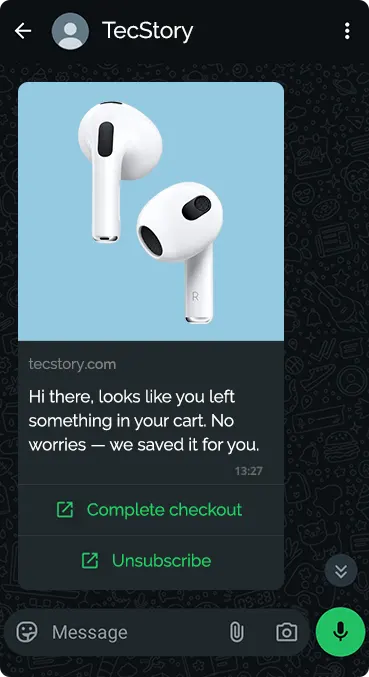
“Hi there, looks like you left something in your cart. No worries — we saved it for you.”
This first message should be gentle. The customer may have been distracted, interrupted or simply needed more time. No need to panic. No need to throw discounts around like confetti.
2nd WhatsApp reminder — stronger nudge
Send after: 24 hours.
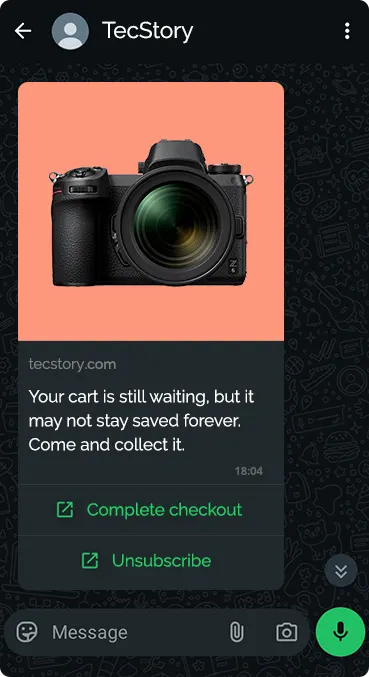
Message idea:
“Your cart is still waiting, but it may not stay saved forever. Come and collect it.”
This message adds a little urgency but still keeps things polite. You are reminding the customer that the cart is saved and making it easy to return.
3rd WhatsApp reminder — final reminder with coupon
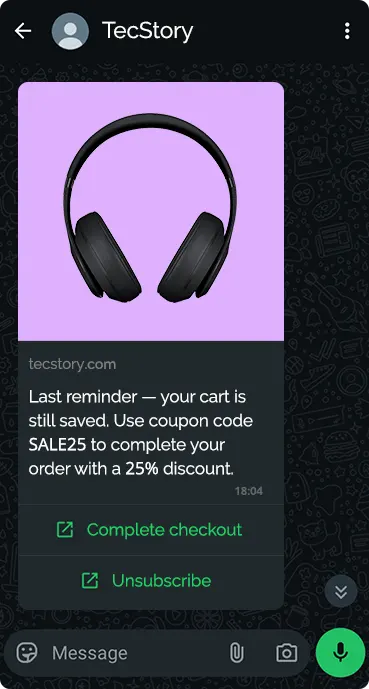
Send after 3 days. Message idea:
“Last reminder — your cart is still saved. Use coupon code [coupon] to complete your order with a discount.”
This final reminder can include an incentive if that makes sense for your store. A coupon can help close the deal, especially if the customer was hesitating because of price, shipping or timing.
Just remember not to overdo it. If every abandoned cart immediately receives a discount, some customers will learn to abandon carts on purpose. And congratulations, you have just trained your customers to wait for coupons.
Best practices for WhatsApp abandoned cart reminders
Before enabling WhatsApp reminders, here are a few practical tips:
- Do not send too many messages. A short sequence of 2–3 reminders is usually a good starting point. If you send too many messages, you may recover a few carts but lose customer trust.
- Do not send messages too early. Give customers time to complete the checkout naturally before reminding them.
- Use Quiet hours. Nobody wants to receive abandoned cart reminders while sleeping.
- Use consent properly. Make sure customers know they may receive phone messages.
- Keep the copy short. WhatsApp is not email. Long messages feel heavy and are easier to ignore.
- Use coupons carefully. Coupons can improve recovery, but they should not become the only reason customers return.
- Track your results. Use reports to understand what is working and what should be improved.
- Test everything. Send test messages before enabling automation for real customers.
Let us recap
We have learned how to use WhatsApp to send abandoned cart reminder messages in WooCommerce.
We started with the most important part — saving abandoned carts. Without saved carts and customer contact details, there is nothing to recover. CartBounty takes care of capturing abandoned carts and provides tools like Exit Intent and Early capture to help collect more recoverable leads.
We then looked at why WhatsApp can be a powerful abandoned cart recovery channel. It is personal, direct and well suited for time-sensitive reminders, but it should be used carefully and with proper customer consent.
After that we covered how to connect CartBounty with WhatsApp using Meta’s WhatsApp Business Platform, how to set up reminder messages, personalize them, include coupons, limit countries, use Quiet hours, exclude specific products and connect the WhatsApp webhook for better reporting.
A good WhatsApp abandoned cart recovery strategy does not have to be complicated. Start simple. Send a helpful reminder. Make it easy for the customer to return. Respect their time and privacy. Track the results. Improve from there.
And with that, your abandoned carts no longer have to vanish silently into the night. Some of them can now receive a friendly WhatsApp reminder and find their way back to the checkout. 🐞





Your thoughts